Study Guide: Study Smarter
A 15-minute Rise 360 module that helps working professionals study more effectively, with four custom activities built in HTML, CSS and JavaScript to fill the gaps.
Try the module for yourself (opens in a new tab, about 15 minutes)
The challenge
Most people studying for a professional qualification are also working full-time. They have little time, and they rely on habits that feel productive but are not: in one study, 84% of university students said they re-read to study (Karpicke, Butler and Roediger, 2009). The demo includes information about study techniques and, drawing on Bloom's taxonomy, asks learners to apply their knowledge.
Many learners have English as a second language, so I wrote in plain English: short sentences, no idioms, and the same term for the same thing every time.
How I structured it
I wrote the outcomes first, then planned the lessons so learners climb Bloom's taxonomy from remembering to creating, and mapped each one to the ABC Learning Design framework to assess the range of activities and make sure the content is not didactic.
| Lesson | What learners do | ABC learning type | Bloom's level |
|---|---|---|---|
| Start here | Learn how to navigate, find support and look up key terms | Orientation | Not applicable |
| 1. Revision. What do you do first? | Reflect on their own habits, then see a real research finding | Investigation | Remember |
| 2. Why it feels like it's working | Learn why re-reading misleads, then check their understanding | Acquisition, Practice | Understand |
| 3. Test yourself. Retrieval practice | Watch a short video, then test themselves with flashcards | Acquisition, Practice | Understand, Apply |
| 4. Spread it out: spacing and mixing | See a spacing pattern, then sort study habits | Acquisition, Practice | Apply |
| 5. Read with purpose, make notes that work | Recall freely, then make and download their own notes | Practice, Production | Apply, Create |
| 6. Plan around work | Review a case study plan, then write their own | Investigation, Production | Evaluate, Create |
Most of the new content sits in lessons 2 to 4, and each of those lessons ends in practice. Learners come away with a copy of their notes, in a format they can reuse in future, as well as a study plan. Discussion and Collaboration are left out on purpose, because a self-paced demo cannot do them properly. In a live course, learners would share their plans in a community.
Key decisions
The module uses what it teaches. Lessons 3 to 6 each open with a quick recall question on an earlier lesson, each in a different format. Retrieval practice is built into the structure of the learning.
No final quiz. A page of multiple-choice questions would have tested at the lowest Bloom's level after learners had already worked at a higher one. Checks are spread through the module instead.
No filler. Each activity is carefully considered to be useful for learners, with no activities added just to fill space.
Nothing fake. No decorative characters or invented feedback. The opening uses a real research finding, and Aisha, the one named character, is there purely as a case study to analyse.
Custom Rise blocks to fill the gaps
Rise has no way for learners to write, check and keep their own work, so I built four activities in HTML, CSS and JavaScript. Three come from one reusable template. Each matches Rise's styling and tells Rise when it is complete, so the Continue button unlocks.
Free recall
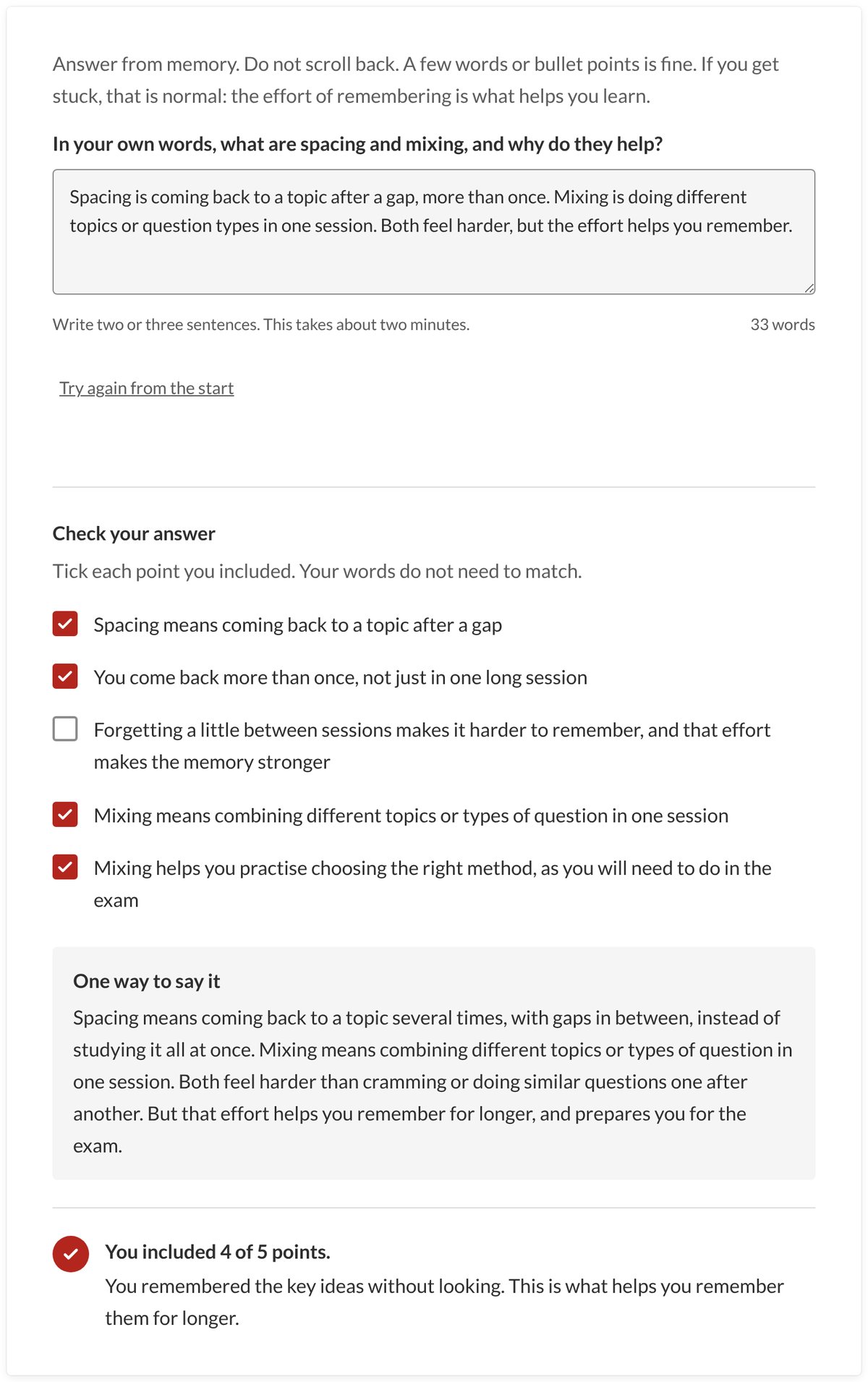
Learners explain an idea from memory in their own words, then tick the key points they included. Free recall is stronger than multiple choice because there are no options to prompt the answer.
Note-maker
The problem. Learners often read passively, highlighting or re-reading a passage without really processing what it says. The note-maker asks them to work with the text instead.
How it works. Learners read a short passage, then use a Cornell-style layout to write the key points in their own words, a cue question for each point and a short summary. They can download their notes as a PDF or Word document, or copy them, and compare them with an example set of notes once they have had a go.
The design thinking. Putting ideas into their own words means learners have to process the passage rather than copy it, and the cues turn their notes into a self-test. Giving learners something to keep matters too: the final lesson asks them to come back in a week, cover the notes column and answer their own cues. A similar note-making approach was used on modules at NTU as a framework for students, particularly in their first year.
Tools. HTML, CSS and JavaScript, built as a Rise code block and styled to match Rise's own blocks. The PDF and Word files are created in the browser, so learners' notes stay on their own device.
Plan review
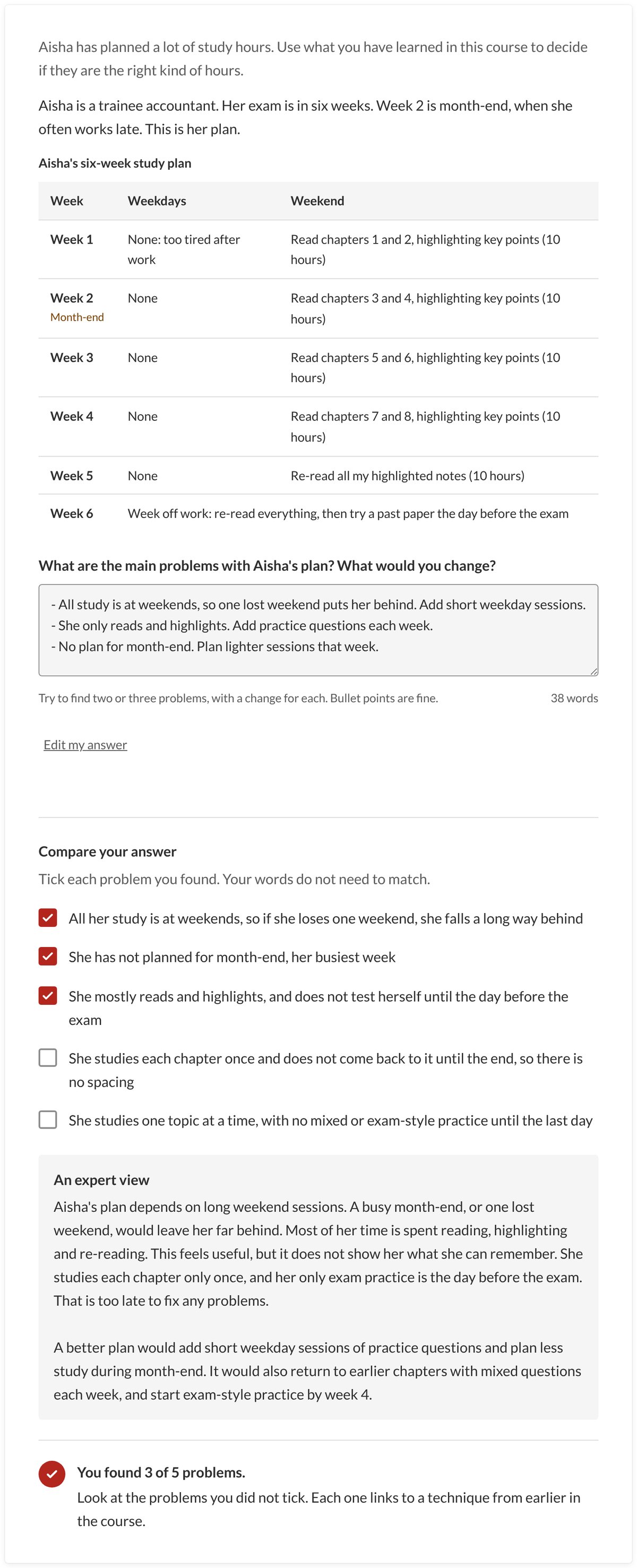
Aisha's plan has plenty of hours, almost all of them reading and highlighting at weekends. Reviewing it gives learners a chance to evaluate and practise what they have learned, before they compare their answer with an expert view.
Plan builder
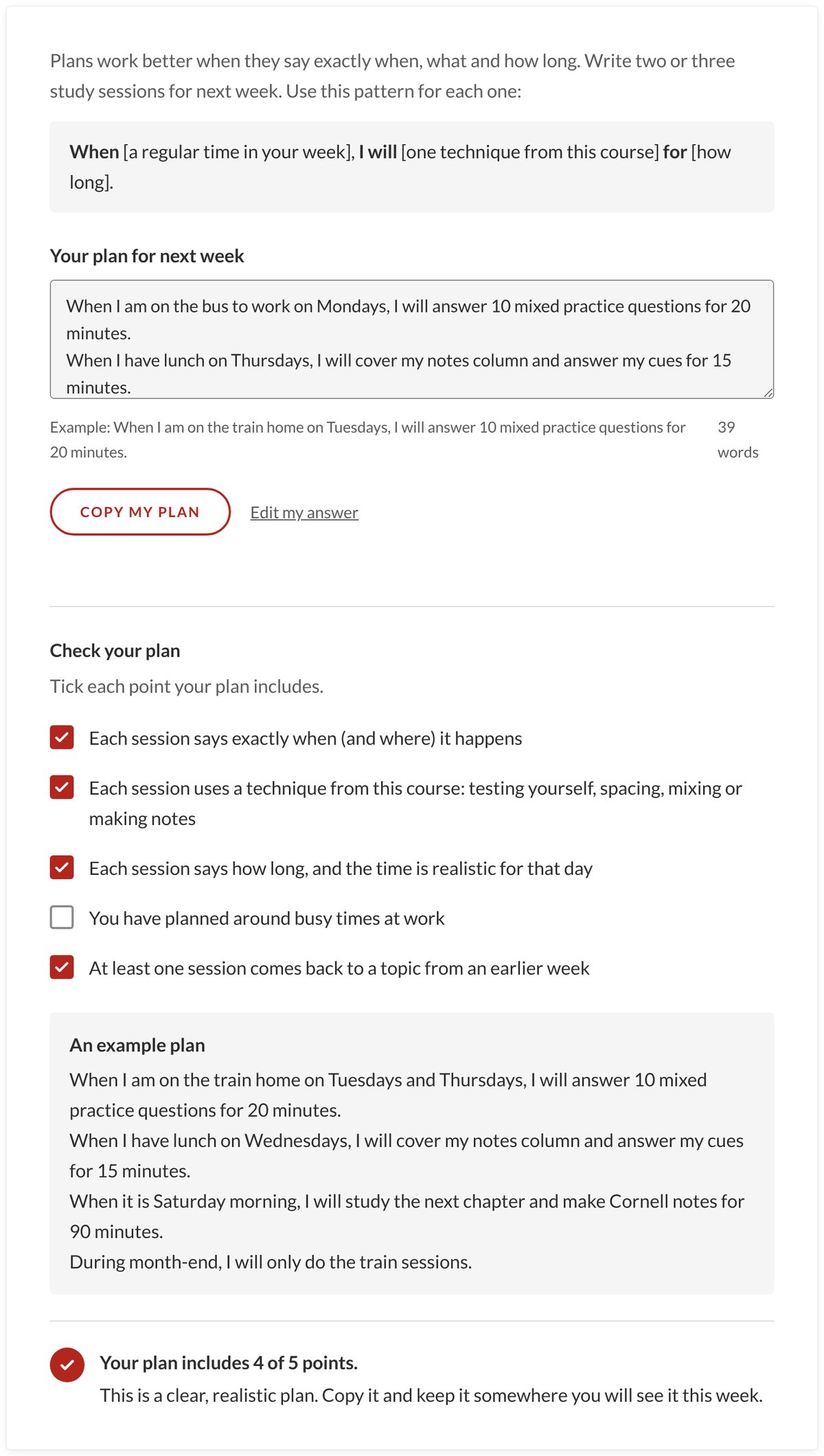
Learners write their sessions for next week as "When [a time], I will [a technique] for [how long]." Plans this specific are more likely to be carried out (Gollwitzer, 1999).

Accessibility
A "Start here" lesson covers navigation, keyboard keys, captions, zoom and translation, with a glossary of key terms. All text is real text, and there is a printable note-making template. The custom activities work with a keyboard, have labelled fields and announce changes to screen readers. They pass automated WCAG 2.2 AA checks.
What I would do next
Test it with real learners and ask for their opinions, then revisit after a few weeks to see whether they have put what they learned into practice.
Tools: Rise 360, HTML, CSS, JavaScript. A demo module by Charlotte Crosby, not affiliated with any professional body.